

Key Takeaways
- Buffer and Hootsuite are best for scheduling; Sprout Social excels at analytics
- Pick one or two social platforms to master before expanding to others
- Consistency matters more than frequency; post on a sustainable schedule
Social media management tools help you schedule posts, analyze performance, and manage multiple accounts from one dashboard. For businesses and creators managing presence across Instagram, Facebook, Twitter, LinkedIn, TikTok, and other platforms, the right tool can save 10+ hours per week while improving consistency and results.
With the average person spending over 2 hours daily on social media, these platforms represent massive opportunities to reach your audience. But managing multiple accounts manually is unsustainable - that's where social media management tools become essential for any serious social media strategy.
Why You Need Social Media Management Tools
Managing social media effectively requires consistency, timing, and data-driven decisions. Here's why tools matter:
- Time Efficiency - Batch-create and schedule content instead of posting manually every day
- Optimal Timing - Post when your audience is most active, even if that's 3 AM
- Consistency - Never miss a posting schedule, even on vacation or sick days
- Data Insights - Understand what content performs best and why
- Team Coordination - Multiple people can collaborate without stepping on each other's toes
- Unified Inbox - Respond to comments and messages across platforms in one place
Top Social Media Management Tools
Hootsuite
Hootsuite is one of the original social media management platforms, now serving over 18 million users worldwide. It offers comprehensive features including scheduling, monitoring, analytics, and team collaboration. The platform supports all major social networks and offers robust enterprise features like compliance tools and advanced permissions.
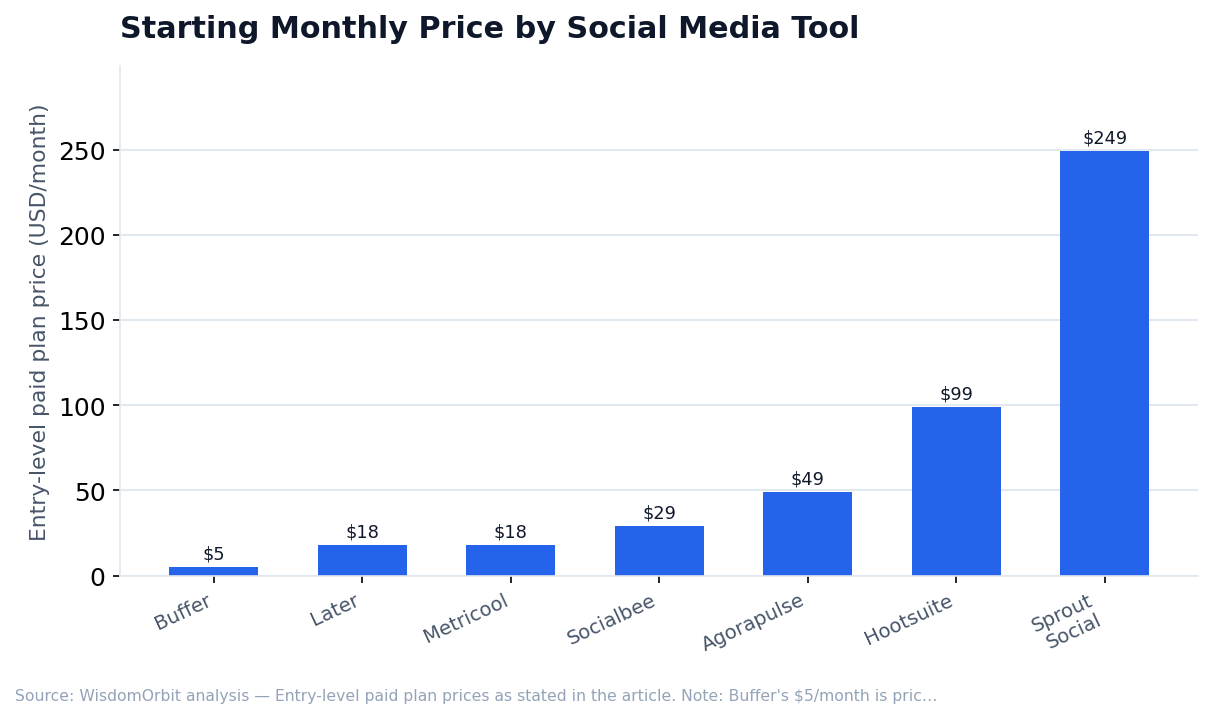
Best for: Medium to large businesses and agencies needing full-featured management. Pricing starts at $99/month for professionals, with enterprise plans available.
Buffer
Buffer built its reputation on simplicity and clean design. The platform focuses on doing scheduling and analytics exceptionally well without overwhelming users with features they don't need. Buffer's intuitive interface makes it easy to learn, and their browser extension lets you schedule content you discover while browsing.
Best for: Solopreneurs and small businesses wanting a straightforward, affordable solution. Free tier available, paid plans from $5/month per channel.
Sprout Social
Sprout Social positions itself as a premium platform with advanced analytics, social listening, and CRM-style contact management. Their reporting capabilities are industry-leading, making it easy to demonstrate ROI to stakeholders. The platform also excels at team workflows with approval processes and task assignment.
Best for: Agencies and larger companies needing advanced analytics and team features. Pricing starts at $249/month.
Later
Later started as an Instagram-first scheduling tool and remains the top choice for visual content creators. Their visual content calendar lets you drag and drop to plan your Instagram grid aesthetically. Later also offers excellent TikTok and Pinterest support, making it ideal for visual-first platforms.
Best for: Instagram-focused creators, visual brands, and influencers. Free tier available, paid plans from $18/month.
Socialbee
Socialbee differentiates itself with content categorization and evergreen recycling features. You can organize content into categories (promotional, educational, entertaining) and set posting ratios. Evergreen content automatically recycles, keeping your feed active without constant content creation.
Best for: Businesses wanting to maximize content reuse and maintain balanced content mix. Plans start at $29/month.
Metricool
Metricool offers a generous free tier with solid analytics capabilities. The platform provides competitor analysis features and best time to post recommendations based on your specific audience data. It's particularly popular in European markets and supports multiple languages.
Best for: Budget-conscious users who prioritize analytics. Free tier includes substantial features, paid from $18/month.
Agorapulse
Agorapulse combines scheduling with excellent social inbox management. Their unified inbox makes it easy to never miss a comment, mention, or message across platforms. The tool also offers social listening, competitor analysis, and ROI tracking for paid campaigns.
Best for: Teams prioritizing community management and customer engagement. Plans start at $49/month.
Essential Features to Look For
Multi-Platform Support
Ensure the tool supports all platforms you use now and might use in the future:
- Instagram - Feed posts, Stories, Reels scheduling
- Facebook - Pages, Groups, Stories
- Twitter/X - Tweets, threads, scheduling
- LinkedIn - Personal and company pages
- TikTok - Video scheduling (limited by platform)
- Pinterest - Pin scheduling
- YouTube - Video publishing support varies
Scheduling Capabilities
- Queue-based posting - Set posting times, add content to queue
- Calendar view - Visual overview of scheduled content
- Bulk scheduling - Upload multiple posts via CSV
- First comment scheduling - Add hashtags as first comment on Instagram
- Optimal timing suggestions - AI-powered best time recommendations
Analytics and Reporting
- Engagement metrics - Likes, comments, shares, saves
- Follower growth - Track audience growth over time
- Best performing content - Identify what resonates
- Exportable reports - PDF/CSV reports for clients or stakeholders
- Competitor benchmarking - Compare performance to competitors
Content Creation and Curation
- Built-in image editing - Resize and edit without leaving platform
- Canva integration - Design directly within the tool
- Content suggestions - RSS feeds and content discovery
- Media library - Store and organize visual assets
- AI caption generation - Help writing post copy
Team Collaboration
- Multiple user seats - Team members with different access levels
- Approval workflows - Content review before publishing
- Task assignment - Assign posts to team members
- Client management - Separate workspaces for different clients (agencies)
Pricing Comparison
- Buffer - Free (3 channels), $5/month per channel, $10/month per channel with analytics
- Later - Free (limited), $18-80/month depending on features
- Hootsuite - $99/month (Professional), $249/month (Team), Enterprise pricing available
- Sprout Social - $249/month (Standard), $399/month (Professional), $499/month (Advanced)
- Socialbee - $29-99/month depending on features and workspaces
- Metricool - Free tier, $18-119/month for paid plans
- Agorapulse - $49-119/month per user
Specialized Social Media Tools
Content Creation
- Canva - Graphic design for social media with templates optimized for each platform
- Adobe Express - Quick professional graphics and video editing
- CapCut - Video editing optimized for TikTok and Reels
- Descript - Video/podcast editing with AI transcription
Link Management
- Linktree - The original link in bio solution
- Stan Store - Link in bio with built-in payments
- Beacons - Customizable link pages with analytics
Social Listening
- Brandwatch - Enterprise social listening and consumer intelligence
- Mention - Monitor brand mentions across the web
- Brand24 - Affordable social listening for smaller businesses
Influencer Marketing
- Influencity - Influencer discovery and campaign management
- Aspire - End-to-end influencer marketing platform
- Grin - Creator management for e-commerce brands
Choosing the Right Tool for Your Needs
Solopreneurs and Creators
Start with Buffer or Later. Both offer free tiers to get started and affordable paid plans. Later is better if Instagram is your primary platform; Buffer works well across all channels.
Small Business Teams
Consider Hootsuite or Socialbee. You'll get team collaboration features, better analytics, and room to grow. Socialbee's content recycling saves significant time.
Marketing Agencies
Sprout Social or Hootsuite Enterprise are designed for agencies managing multiple clients. Look for white-label reporting, client workspaces, and bulk scheduling features.
E-commerce Brands
Later or Planoly work well for visual-first e-commerce. Consider tools with shoppable post features and Instagram/Pinterest optimization.
Frequently Asked Questions
Can I schedule posts to all platforms for free?
Buffer and Later offer free tiers with limited channels and posts. For comprehensive free scheduling, consider native platform tools like Meta Business Suite (Facebook/Instagram) or X Pro, formerly TweetDeck (X/Twitter).
Will scheduling hurt my reach?
No - platforms don't penalize scheduled posts. In fact, consistent posting at optimal times (enabled by scheduling) typically improves reach compared to sporadic manual posting.
Can these tools post to TikTok automatically?
TikTok's API has limitations. Most tools can remind you to post or send to your phone for final publishing, but direct auto-posting is limited due to platform restrictions.
Do I need separate tools for scheduling and analytics?
Most management tools include both. However, for deep analytics, you might supplement with native platform insights or dedicated analytics tools like Iconosquare.
Getting Started
Start with a free trial of 2-3 tools that match your needs. Test the scheduling workflow, explore analytics, and evaluate how intuitive the interface feels. The best tool is the one you'll actually use consistently, so prioritize ease of use alongside features.
You May Also Like


Sources & References
- Pew Research Center – Social Media Usage Statistics
- Sprout Social – Social Media Index Reports
- Hootsuite – Social Trends Reports
- Buffer – State of Social Media reports and engagement benchmarks