

Good accounting software is essential for any business, whether you're a freelancer managing a handful of clients or a growing company with employees and inventory. The right accounting solution helps you track income and expenses, send professional invoices, manage payroll, reconcile bank accounts, and prepare for taxes without the headache of manual spreadsheets.
Modern accounting software does more than just crunch numbers. It provides real-time insights into your business health, automates repetitive tasks, and ensures you never miss a tax deadline. Studies show that businesses using dedicated accounting software save an average of 5-10 hours per month on bookkeeping tasks and reduce accounting errors by up to 90%.
Why You Need Accounting Software
Many small business owners start with spreadsheets or even paper records, but this approach quickly becomes unsustainable as your business grows. Here's why dedicated accounting software is worth the investment:
- Time Savings - Automate bank feeds, recurring invoices, and expense categorization
- Accuracy - Reduce human error with automatic calculations and reconciliation
- Tax Compliance - Track deductible expenses and generate tax-ready reports
- Cash Flow Visibility - See exactly where your money is going in real-time
- Professional Image - Send polished invoices that get paid faster
- Scalability - Grow without outgrowing your financial systems
Key Features to Look For
When evaluating accounting software, prioritize these essential features based on your business needs:
- Income/Expense Tracking - Automatically import and categorize transactions from your bank accounts and credit cards. Look for software that learns your categorization preferences over time.
- Invoicing - Create and send professional invoices with your branding. Features like automatic payment reminders and online payment options help you get paid faster.
- Bank Connections - Direct feeds from your financial institutions eliminate manual data entry and keep your books current.
- Reporting - Essential reports include profit and loss statements, balance sheets, cash flow statements, and accounts receivable aging.
- Tax Preparation - Export data for your accountant or integrate directly with tax software. Some platforms offer built-in tax filing.
- Multi-Currency Support - If you work with international clients, you'll need support for multiple currencies and exchange rates.
- Inventory Management - Product-based businesses need to track stock levels, cost of goods sold, and reorder points.
- Payroll Integration - Running payroll in the same system simplifies tax reporting and reduces errors.
Top Accounting Software Options
QuickBooks Online
QuickBooks Online is the industry standard for small business accounting, used by over 7 million businesses worldwide. Its comprehensive feature set covers everything from basic bookkeeping to advanced inventory management and payroll. The platform offers excellent third-party integrations with over 750 apps, including popular tools like Shopify, Square, and PayPal.
One of QuickBooks' biggest advantages is accountant familiarity - virtually every bookkeeper and CPA knows how to use it, making collaboration seamless. The mobile app is robust, allowing you to send invoices, capture receipts, and check your finances on the go. Plans range from $30-200/month depending on features needed.
FreshBooks
FreshBooks is the top choice for service-based businesses, freelancers, and consultants who prioritize time tracking and invoicing. The interface is exceptionally user-friendly, making it ideal for non-accountants who want to manage their own books without a steep learning curve.
Standout features include automatic time tracking, project profitability reports, and beautiful invoice templates. FreshBooks also offers excellent client portals where customers can view invoices, make payments, and communicate about projects. Plans start at $17/month and go up to $55/month for growing teams.
Xero
Xero has emerged as a powerful QuickBooks alternative, particularly popular in the UK, Australia, and New Zealand. A key differentiator is unlimited users on all plans - you won't pay extra as your team grows. The platform excels at bank reconciliation with smart matching algorithms that learn your patterns.
Xero's app marketplace includes over 1,000 integrations, and its API is developer-friendly for custom solutions. The platform is particularly strong for businesses with multiple entities or international operations. Pricing ranges from $13-70/month.
Wave
Wave offers completely free accounting software that's surprisingly capable for small businesses and solopreneurs. You get unlimited income and expense tracking, invoicing, receipt scanning, and financial reporting at no cost. Wave makes money through optional paid services like payment processing and payroll.
While Wave lacks some advanced features like inventory management and time tracking, it's an excellent starting point for new businesses watching their budget. The interface is clean and intuitive, and there are no artificial limitations on the number of transactions or invoices.
Zoho Books
Zoho Books offers excellent value with robust features at competitive prices. It integrates seamlessly with the broader Zoho ecosystem (CRM, Projects, Inventory), making it ideal for businesses already using Zoho products. The automation features are particularly impressive, allowing you to create complex workflows without coding.
Zoho Books includes built-in project management, time tracking, and a client portal. The free tier supports businesses with under $50K in annual revenue. Paid plans range from $15-70/month.
Sage Business Cloud Accounting
Sage has been a trusted name in accounting software for decades, and their cloud offering brings that expertise online. Sage excels at compliance and is particularly popular with businesses that need robust audit trails and financial controls. The platform offers strong multi-company support for entrepreneurs managing multiple ventures.
Pricing Comparison
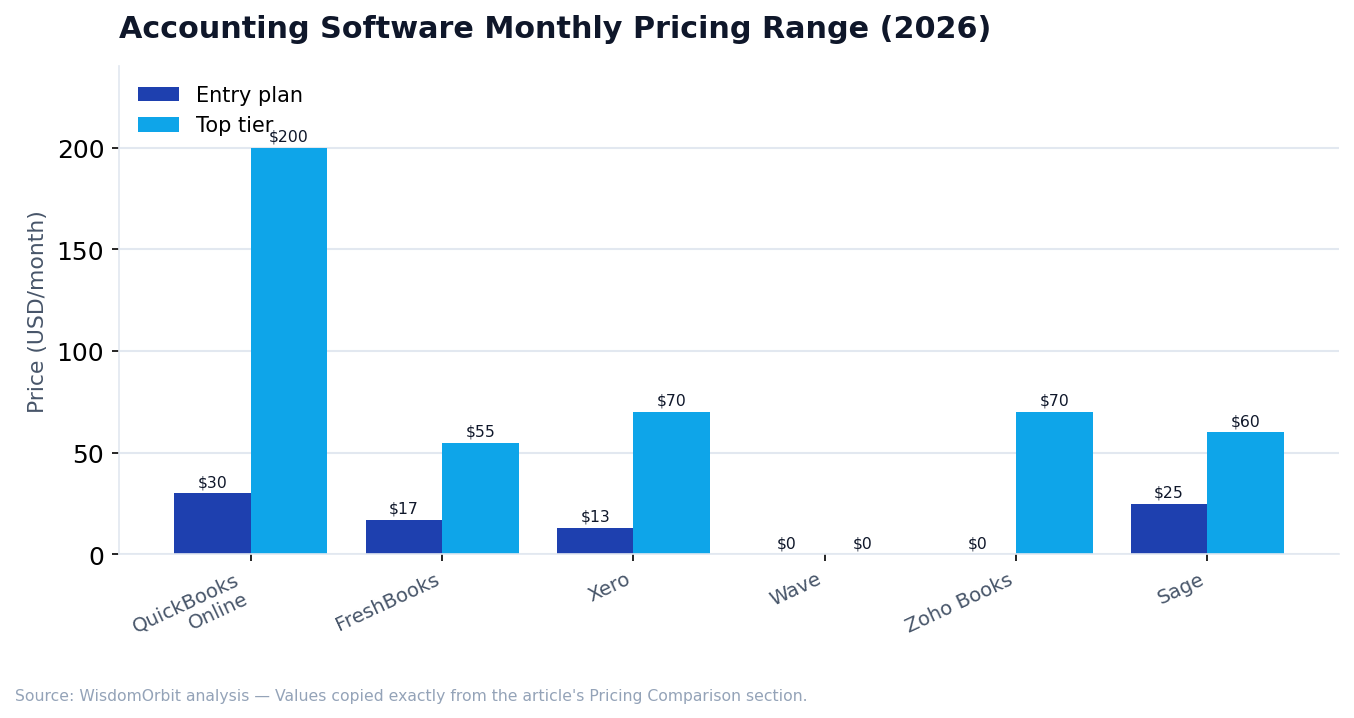
- QuickBooks Online - $30-200/month (Simple Start to Advanced)
- FreshBooks - $17-55/month (Lite to Premium)
- Xero - $13-70/month (Early to Established)
- Wave - Free (paid add-ons for payments/payroll)
- Zoho Books - Free-$70/month (Free to Elite)
- Sage - $25-60/month (Start to Accounting)
How to Choose the Right Software
Consider these factors when making your decision:
- Business Type - Service businesses benefit from time tracking (FreshBooks), while product businesses need inventory features (QuickBooks, Zoho)
- Team Size - If you have multiple users, Xero's unlimited users policy offers the best value
- Budget - Wave is unbeatable for bootstrapped businesses; paid options offer more automation
- Accountant Preference - Ask your accountant what they prefer working with
- Integration Needs - Check if your essential business tools connect to the platform
- Growth Plans - Choose software that can scale with your business to avoid painful migrations later
Common Accounting Software Mistakes to Avoid
- Not reconciling regularly - Reconcile your accounts weekly or monthly, not just at tax time
- Mixing personal and business expenses - Keep separate accounts and cards for your business
- Ignoring the learning curve - Invest time in tutorials and setup to get the most from your software
- Skipping bank connections - Manual entry leads to errors and wasted time
- Choosing based on price alone - The cheapest option may cost more in time and frustration
Frequently Asked Questions
Can I switch accounting software later?
Yes, most accounting platforms allow you to export your data and import it into a new system. However, switching mid-year can be complicated, so it's best to migrate at the start of a new fiscal year if possible.
Do I still need an accountant if I use accounting software?
Accounting software handles day-to-day bookkeeping, but most businesses still benefit from professional accountant review, especially for tax planning, complex transactions, and year-end financials.
Is cloud accounting software secure?
Reputable cloud accounting platforms use bank-level encryption, two-factor authentication, and regular security audits. Your data is often safer in the cloud than on a local computer.
What's the difference between accounting and bookkeeping software?
Bookkeeping focuses on recording transactions, while accounting includes analysis, reporting, and financial strategy. Most small business "accounting" software handles both bookkeeping and basic accounting needs.
How long should I keep my accounting records?
The IRS recommends keeping tax records for at least 3 years, but many experts suggest 7 years. Cloud accounting software typically stores your data indefinitely as long as you maintain your subscription.
Getting Started
Most accounting software offers free trials ranging from 14-30 days. Take advantage of these trials to test the interface, import some transactions, and see how the software fits your workflow before committing. Many platforms also offer free migration assistance to help you switch from spreadsheets or another accounting system.
Sources & References
- IRS – Business Tax Requirements
- AICPA – American Institute of CPAs accounting standards and best practices
- U.S. Small Business Administration – Financial management guidance for small businesses
- FASB – Financial Accounting Standards Board guidelines
Related Articles
This article is for general information only and is not financial, legal, or tax advice. Verify current rates, fees, and terms with providers before making decisions.