

Key Takeaways
- Shared hosting is enough for most new websites under 10,000 monthly visitors
- Look for hosts that include free SSL, daily backups, and 24/7 support
- Avoid long-term contracts until you have tested the service for reliability
Choosing the right web hosting provider is crucial for your website's success. Your host directly affects site speed, uptime, security, and ultimately your visitors' experience - and your bottom line. Studies show that a one-second delay in page load time can reduce conversions by 7%. When your site goes down, you lose visitors and revenue. This guide compares the top hosting providers to help you make an informed decision.
Web hosting is where your website's files live. When someone types your domain name, their browser connects to your hosting server, which sends the website files to display. The quality of that server - its speed, reliability, and security - determines how well your site performs for every visitor.
Types of Web Hosting
Shared Hosting
The most affordable option where your site shares server resources (CPU, RAM, storage) with hundreds of other websites on the same server. Think of it as renting an apartment in a building - you share common resources like plumbing and electricity. Shared hosting is perfect for small websites, blogs, and beginners with limited traffic. Prices start around $2-5/month.
The downside: other sites on your server can affect your performance during traffic spikes, and you have limited control over server configuration. For most small sites, shared hosting works fine.
VPS Hosting
Virtual Private Server hosting gives you dedicated resources on a server shared with fewer sites. You get guaranteed CPU, RAM, and storage that others can't touch - like owning a condo versus renting an apartment. VPS offers more power, root access, and control than shared hosting. Typically $20-80/month.
VPS is ideal for growing sites that have outgrown shared hosting, sites with moderate traffic spikes, and users who need specific server configurations. Requires some technical knowledge to manage, though managed VPS options exist.
Dedicated Hosting
An entire physical server dedicated exclusively to your website. You get maximum performance, complete control, and no resource sharing - like owning your own building. Dedicated servers handle high traffic volumes, complex applications, and demanding workloads. Costs $80-300+/month.
Best for large businesses, high-traffic sites, and applications with specific hardware or security requirements. Requires technical expertise to manage or additional cost for managed services.
Cloud Hosting
Your site runs on a network of connected servers (the "cloud") rather than a single physical machine. This provides excellent scalability - resources can be increased or decreased as needed - and redundancy if one server fails. Great for sites with unpredictable or variable traffic. Pay-as-you-go pricing means you only pay for what you use.
Cloud hosting combines benefits of VPS (dedicated resources) with flexibility and reliability. Popular providers include AWS, Google Cloud Platform, and DigitalOcean, often accessed through managed platforms like Cloudways.
Managed WordPress Hosting
Hosting optimized specifically for WordPress with features like automatic updates, WordPress-specific security, staging environments for testing changes, enhanced caching, and expert WordPress support. Available in both shared and dedicated tiers. Managed WordPress hosts handle the technical WordPress management so you can focus on content.
Best for WordPress users who want optimal performance and security without managing technical details themselves.
Top Web Hosting Providers
Bluehost
Officially recommended by WordPress.org, Bluehost is one of the most popular hosts for beginners. They offer a free domain for the first year, free SSL certificate, 24/7 phone support, and easy one-click WordPress installation. Plans start at $2.95/month (promotional rate). The interface is beginner-friendly, and most small sites work perfectly on their shared hosting.
Renewal rates are higher than intro pricing (a common industry practice), and performance doesn't match premium hosts. But for the price and ease of use, Bluehost is hard to beat for beginners.
Best for: WordPress beginners, small business websites, and blogs.
SiteGround
Known for excellent customer support (consistently rated highest in the industry) and strong performance, SiteGround offers managed WordPress hosting with daily backups, free CDN through Cloudflare, advanced security with AI anti-bot protection, and a custom caching system. Server locations span four continents.
SiteGround's renewal rates are higher than budget hosts, but many users find the service quality justifies the cost. Their support team responds quickly and actually solves problems.
Best for: Users who prioritize support quality and performance over rock-bottom pricing.
HostGator
A budget-friendly option offering unlimited bandwidth and storage on most plans, which appeals to beginners worried about limits. HostGator provides a 45-day money-back guarantee (longer than most competitors), free website builder, and one-click installs. Good for simple websites and blogs where performance isn't critical.
Best for: Budget-conscious users and basic websites.
Cloudways
A managed cloud hosting platform that lets you choose your cloud provider - AWS, Google Cloud, DigitalOcean, Linode, or Vultr - then handles server management for you. You get cloud performance and scalability without needing to manage servers directly. Cloudways offers a unique pay-as-you-go model with no long-term contracts.
The platform includes built-in caching, free SSL, automated backups, and staging environments. Support is good though not WordPress-specialized like dedicated WordPress hosts.
Best for: Developers, agencies, and growing businesses wanting cloud power with managed convenience.
WP Engine
Premium managed WordPress hosting trusted by major brands. WP Engine provides enterprise-grade security, automatic updates with visual regression testing, proprietary EverCache technology for speed, and a development workflow with staging and local development environments. Support staff are WordPress experts.
WP Engine costs more than other options, but businesses relying on WordPress for revenue often find the reliability, performance, and support worth the investment. Their Genesis framework and StudioPress themes are included free.
Best for: Businesses serious about WordPress who can invest in quality hosting.
Kinsta
Built on Google Cloud Platform infrastructure, Kinsta offers premium WordPress hosting with excellent performance. Their dashboard is modern and user-friendly, and every site gets its own isolated container for security and resource allocation. Daily backups, free migrations, and staging environments are standard.
Best for: High-traffic WordPress sites and developers wanting Google Cloud infrastructure without complexity.
A2 Hosting
Known for their "Turbo" servers that offer significantly faster page loads than typical shared hosting. A2 offers a good balance of performance and price, with server locations worldwide. They provide a free site migration service and support various CMS platforms beyond WordPress.
Best for: Users wanting better-than-average shared hosting performance at reasonable prices.
What to Look For in Web Hosting
- Uptime Guarantee - Look for 99.9% or higher uptime guarantees. Some hosts offer credit if they miss targets, though this doesn't restore lost traffic.
- Speed/Performance - Fast servers with SSD/NVMe storage, modern PHP versions, server-side caching, and CDN integration make real differences.
- Security - Free SSL certificates (essential for SEO and trust), malware scanning, firewalls, DDoS protection, and regular security updates.
- Support - 24/7 availability via chat, phone, or email. Test support before committing - ask a pre-sales question and see how they respond.
- Scalability - Easy upgrade path as your site grows. You shouldn't need to migrate to a new host when traffic increases.
- Backups - Automatic daily or weekly backups with easy restore options. Some hosts charge extra for backups - check what's included.
- Money-Back Guarantee - At least 30 days to test the service. Longer is better.
- Server Locations - Servers closer to your audience improve page load times. Multiple locations help if you serve international visitors.
Pricing Comparison
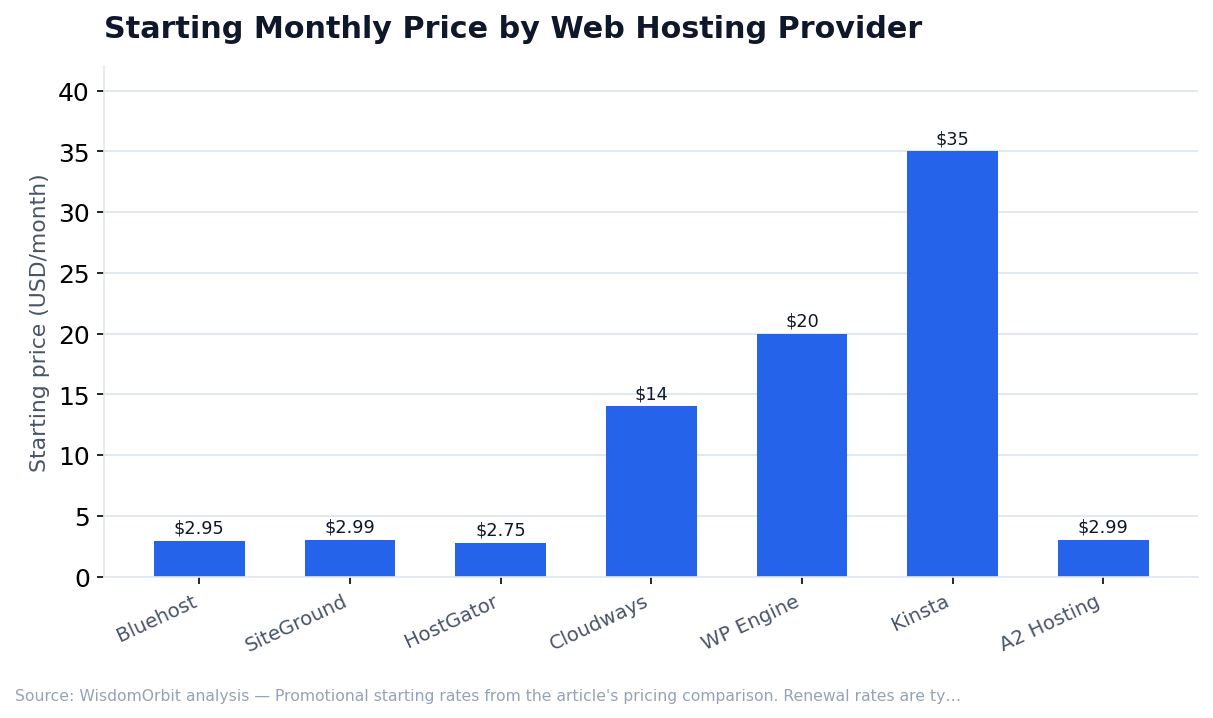
- Bluehost - $2.95-13.95/month (shared), $19.95-49.95/month (VPS)
- SiteGround - $2.99-7.99/month (shared), $100-400/month (cloud)
- HostGator - $2.75-5.25/month (shared), $19.95-39.95/month (VPS)
- Cloudways - $14-46/month starting (cloud, scales up based on usage)
- WP Engine - $20-60/month (managed WordPress)
- Kinsta - $35-330/month (managed WordPress)
- A2 Hosting - $2.99-12.99/month (shared)
Note: Promotional prices require 1-3 year commitments. Renewal rates are typically 2-3x higher. Always check renewal pricing before signing up.
Choosing the Right Host
Consider these factors when selecting your host:
- Traffic Expectations - Shared hosting handles up to ~25,000 monthly visitors comfortably; VPS or cloud for higher traffic.
- Technical Skill - Managed hosting handles technical details for beginners; unmanaged gives control to developers.
- Budget - Factor in renewal rates, not just introductory prices. A $3/month intro that renews at $12/month costs more long-term than $8/month flat pricing.
- Site Type - E-commerce sites need more resources, better security, and SSL than simple blogs. Complex sites need VPS or dedicated resources.
- Support Needs - If you'll need help, prioritize hosts with responsive, knowledgeable support teams.
Frequently Asked Questions
Can I switch hosting providers later?
Yes. Most hosts offer free migration services, or you can migrate manually. It takes some effort but isn't particularly difficult. Choose wisely upfront to avoid the hassle, but don't feel permanently locked in.
Is free hosting ever a good option?
Rarely. Free hosts typically have slow performance, limited features, forced advertising, and unreliable uptime. For any serious website, even budget shared hosting ($3-5/month) is worth the investment.
Do I need a dedicated IP address?
Not for most websites. Shared IPs work fine and don't affect SEO. Dedicated IPs matter primarily for SSL certificates on older setups (SNI solved this) and specific email deliverability situations.
Getting Started
For most new websites, start with quality shared hosting (SiteGround or Bluehost) and upgrade when you outgrow it. If you're launching a business site with expectations of significant traffic, consider starting with VPS or cloud hosting. Don't overpay for resources you won't use, but don't choose the cheapest option purely on price - hosting directly affects your visitors' experience and your site's success.
Sources & References
- Google – Page Experience & Core Web Vitals
- Netcraft – Web Server Surveys
- W3Techs – Web hosting technology market share statistics
- Cloudflare – Internet Performance Data