

Key Takeaways
- Shopify dominates for ease of use; WooCommerce wins on flexibility
- Factor in transaction fees, not just monthly subscription costs
- Start with a platform that scales; migrating mid-growth is disruptive
Choosing the right e-commerce platform is one of the most important decisions for your online business. The platform you select affects your store's functionality, design options, scalability, and ultimately your success. With global e-commerce sales exceeding $6 trillion annually, the right platform can help you capture your share of this massive market.
Today's e-commerce platforms handle much more than just transactions. They manage inventory, process payments, handle shipping, support marketing, and provide analytics. Understanding the strengths and limitations of each platform helps you make an informed choice that supports your business for years to come.
What to Look for in an E-commerce Platform
- Ease of Use - How quickly can you set up and manage your store without technical expertise? Consider the admin interface, product management, and order processing.
- Design Flexibility - Quality of templates, customization options, and whether you can match your brand identity.
- Payment Processing - Supported payment gateways, transaction fees, and international payment options.
- Scalability - Can the platform grow with your business from 10 orders to 10,000 orders without significant friction?
- SEO Capabilities - Customizable URLs, meta tags, image optimization, and technical SEO features to rank in search engines.
- App/Plugin Ecosystem - Third-party integrations for email marketing, accounting, inventory, and specialized functionality.
- Support and Resources - Documentation, customer support quality, and community resources for troubleshooting.
Top E-commerce Platforms
Shopify
The dominant hosted e-commerce platform powering over 4 million stores worldwide, including major brands like Gymshark and Allbirds. Shopify offers a complete solution: hosting, payment processing (Shopify Payments), thousands of apps, and professional templates. The platform is known for reliability and an interface that beginners can master quickly.
Shopify handles the technical complexity while you focus on products and marketing. However, customization beyond templates requires Liquid (Shopify's templating language), and the app ecosystem means recurring costs can add up. Transaction fees apply unless you use Shopify Payments.
Best for: Beginners to advanced merchants wanting a complete, reliable solution without managing hosting or security.
WooCommerce
A free WordPress plugin that transforms any WordPress site into a full-featured online store. WooCommerce powers approximately 28% of all online stores - more than any other platform. Because it's open-source and built on WordPress, WooCommerce offers maximum flexibility and control over every aspect of your store.
The tradeoff is responsibility. You manage hosting, security, updates, and performance. The free base plugin requires paid extensions for many features standard elsewhere (subscriptions, advanced shipping, bookings). However, for WordPress-savvy users who want full ownership and unlimited customization, WooCommerce is unmatched.
Best for: WordPress users, those wanting full control, developers who can customize, and businesses with specific requirements needing unlimited flexibility.
BigCommerce
A robust hosted platform that includes more features out-of-the-box than competitors, reducing reliance on paid apps. BigCommerce excels at multi-channel selling with native integrations for Amazon, eBay, Facebook, Instagram, and more. Notably, BigCommerce charges no transaction fees on any plan.
BigCommerce offers more built-in B2B features, flexible APIs for headless commerce, and doesn't penalize you for using preferred payment processors. The platform is less intuitive than Shopify but more capable for complex catalogs and multi-channel strategies.
Best for: Growing businesses selling across multiple channels, B2B e-commerce, those wanting robust features without app fees.
Wix eCommerce
Part of the popular Wix website builder, their e-commerce features combine visual design simplicity with solid store functionality. The drag-and-drop editor makes creating beautiful stores accessible to anyone, and templates are modern and mobile-optimized.
Wix works well for smaller catalogs and businesses where website design is as important as commerce features. Advanced e-commerce functionality is more limited than dedicated platforms, and switching away from Wix later is difficult because of proprietary design tools.
Best for: Small businesses prioritizing design, service businesses with simple product offerings, beginners wanting an easy visual builder.
Squarespace Commerce
Known for stunning templates and an intuitive interface, Squarespace is the premium choice for visual brands, artists, and creators. The design quality is consistently excellent, and the editor balances flexibility with ease of use.
E-commerce features have improved significantly but still lag dedicated platforms for complex needs. Third-party integrations are limited compared to Shopify or WooCommerce. Squarespace works best when your brand identity and visual presentation are primary differentiators.
Best for: Visual brands, artists, photographers, creators, and businesses where design quality matters most.
Adobe Commerce (formerly Magento)
Enterprise-level platform for large businesses with complex requirements. Adobe Commerce handles massive product catalogs, complex B2B workflows, multiple storefronts, and advanced customization. Major retailers including Nike and Ford use Magento-based solutions.
The platform requires significant technical resources - most implementations involve developer teams or agencies. Costs are substantially higher than other options, including hosting, development, and the Adobe Commerce license for full features.
Best for: Enterprise businesses with technical teams, complex B2B requirements, large catalogs, and multi-site needs.
Shopify Plus
Shopify's enterprise tier for high-volume merchants, offering advanced features like Shopify Flow (automation), Launchpad (scheduled releases), and dedicated support. Plus handles flash sales, high traffic, and complex checkout customizations that standard Shopify cannot.
Best for: High-volume merchants wanting Shopify's ease of use with enterprise capabilities.
Pricing Comparison
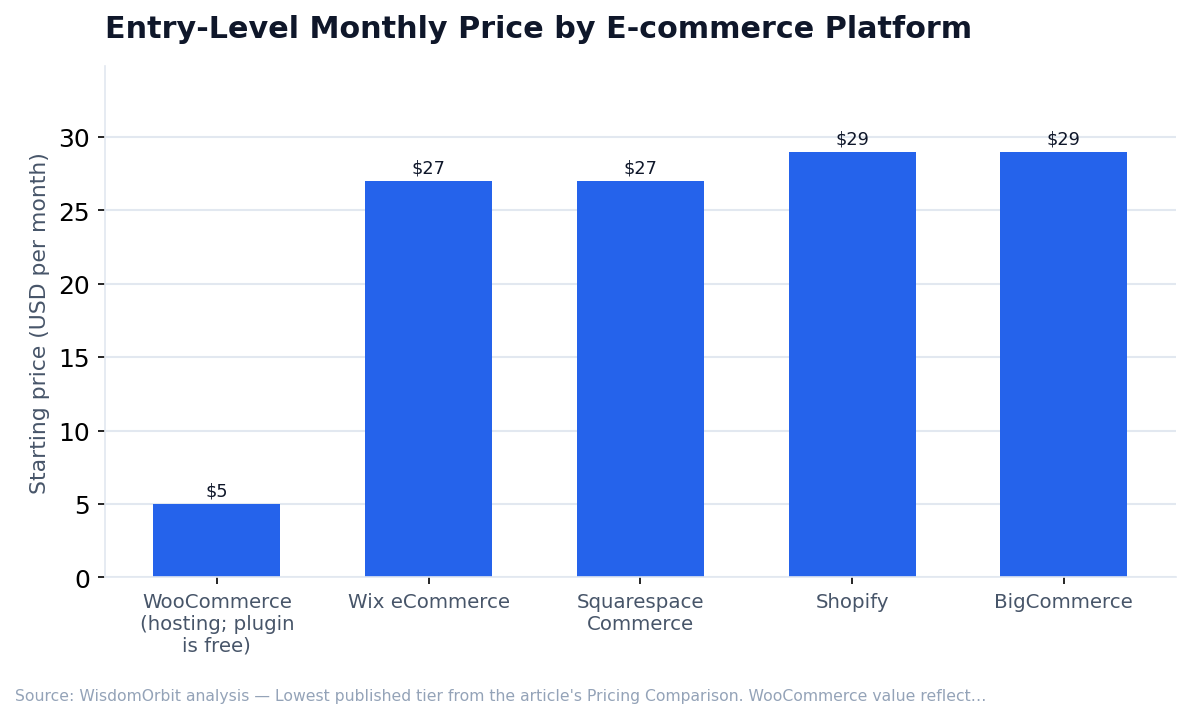
- Shopify - $29-$299/month + 2.9%+30¢ transaction fees (0% extra with Shopify Payments)
- WooCommerce - Free plugin; hosting $5-$100+/month; extensions vary ($0-$299 each)
- BigCommerce - $29-$299/month, no transaction fees, sales thresholds for plan upgrades
- Wix eCommerce - $27-$59/month
- Squarespace Commerce - $27-$49/month (3% transaction fee on lowest tier)
- Adobe Commerce - Custom pricing ($20,000-$100,000+/year for enterprise)
- Shopify Plus - Starting at $2,000/month
Platform Comparison by Business Type
Beginners and Small Businesses
Shopify or Wix. Both offer intuitive interfaces, quick setup, and don't require technical expertise. Shopify for more e-commerce focus; Wix if website design is equally important.
WordPress Users
WooCommerce. If you're already running WordPress or want full control, WooCommerce integrates seamlessly and offers unlimited customization.
Multi-Channel Sellers
BigCommerce or Shopify. Both integrate well with Amazon, eBay, and social commerce. BigCommerce has stronger native multi-channel features; Shopify has more third-party apps.
Visual Brands and Creators
Squarespace or Shopify. Squarespace for portfolio-quality design; Shopify for more commerce features while still looking professional.
Dropshipping and Print-on-Demand
Shopify with DSers or Printful integrations (Oberlo was discontinued in 2022). The app ecosystem for fulfillment automation is most developed on Shopify.
Enterprise and High-Volume
Shopify Plus, Adobe Commerce, or BigCommerce Enterprise. Choose based on technical resources: Shopify Plus for managed simplicity; Adobe Commerce for maximum customization.
Essential E-commerce Features
- Mobile-Responsive Design - Over 60% of e-commerce traffic is mobile. Ensure checkout works flawlessly on phones.
- Inventory Management - Track stock levels, receive low-stock alerts, manage variants (sizes, colors).
- Flexible Shipping - Real-time carrier rates, shipping zones, free shipping thresholds, local delivery options.
- Tax Calculation - Automatic tax collection based on location, especially important for US sales tax compliance.
- Abandoned Cart Recovery - Automated emails to customers who didn't complete checkout. Recovers 5-15% of lost sales.
- Product Reviews - Social proof drives conversions. Native or integrated review functionality is essential.
- Discount and Promotion Tools - Percentage off, dollar amount off, buy-one-get-one, automatic discounts.
- Analytics and Reporting - Sales reports, traffic analysis, customer behavior insights.
- SSL Security - Required for payment processing and customer trust. Most platforms include this.
Frequently Asked Questions
Can I migrate from one platform to another?
Yes, though complexity varies. Products, customers, and orders can typically be exported and imported. Design and customizations usually need rebuilding. Plan migrations carefully and consider timing around slow sales periods.
Do I need a separate payment processor?
Most platforms offer integrated payment processing (Shopify Payments, BigCommerce with multiple processors, etc.). You can usually also add PayPal, Stripe, or other processors. Compare fees and international support for your situation.
How important is SEO for e-commerce?
Very important. Organic search drives significant traffic for most successful stores. Ensure your platform supports customizable URLs, meta descriptions, alt text, fast loading, and proper structured data.
Getting Started
Start with free trials to test each platform's interface and features before committing. Focus on how easily you can add products, customize design, and process test orders. The best platform is one you can use effectively and that scales with your ambitions.
Sources & References
- U.S. Census Bureau – E-Commerce Statistics
- Gartner – Digital commerce platform evaluations
- Forrester Research – B2C and B2B commerce platform analysis
- Internet Retailer – Annual e-commerce platform rankings and market share data